Tuesday, May 16, 2017

Photomontage

By practicing Birds with Arms you should be able to (in Photoshop):
Use Layer Mask
Use Image/Adjustment for ind layer colors
Use Layer Adjustments for overall color
Use Clone stamp
Clone stamp how to (fast forward to 50 seconds in)
Use the Spot Healing brush


Remember- never believe a photo ever again! Want more?
Search for Celebrity BeforeAfter...

Today we will all begin the Photomontage project.

Mixed Messages Photomontage Targets:
My work is stronger because I use the elements and principles of art/design.
I can effectively use digital tools to make art that communicates my ideas to an audience.
I can make creative work (Imaginative Expression) that is successful in Meaning & Function.

Where do you begin?  Research thematic choices:

Shock/Dark/Horror


Humor/Whimsy


Personal Meaning or Metaphor


Personal Paradise or Nightmare


Friday, May 12, 2017

Rising Artist Show! Birds with Arms!

See you tonite!  Come get your sticker!

Photoshop Masking & Montaging : Practice more with combining images
How to?
Photoshop/ New File/ 5x7" 300 res
File/Place the bird (or bear)
File/Place the arms (or beak)
Follow along to learn the Masking tools

Birds with arms

well blended

poorly blended


 Other bird combos


Animals without necks


Bears with beaks


Extra/Above and Beyond...Celebrities without eyebrows... or teeth

Wednesday, May 10, 2017

Stickers and Art Shows!

- Rising
Find your work. Trim if necessary.
Find a black board that fits it. Tape onto board neatly.
Tape your nametag on the bottom right corner of the board.
Hang on one of the display boards in the room.

2- Stickers.
1. Finalize your letter size ( 8.5x11") page with any and all stickers you want to print.
2. From Illustrator, print to the HPM 750 printer, Letter size, Fit to Page.
3. When Guss says OK, hit print.
4. Go get your stickers. Put tape on it. Cut out stickers. Yay you have stickers!
5. Save for Web as a JPG for your portfolio and put in your portfolio.


Coming up next... Photomontage...Check some artists out


Dariusz Klimczak
Frederik Odman- montage artist with sweet website.
A cool photomontage-est
Another cool photomontager- surreal landscapes

Things we will do with Photoshop first...

Birds with Arms

Celebrities without teeth

Monday, May 8, 2017

Rising Artist Show Piece!

The Rising Artist Show will be Friday May 12th in the Media Center from 6-8pm.
We hope you can make it! Bring family/friends!


Prepare a piece for the Rising Artist Show
If you want to print (anything without a photo in it)
Word It
Portfolio cover design
tablet drawing
Monogram logos
Sticker designs

DO THIS>>>>  Open Illustrator. Create a new 11x17 (tabloid size) document.
Open the original piece in Illustrator.
Copy/Paste over what you want on the page.
Design to fill the space.
Print to HPM 750 printer. Make sure dimensions are for 11x17 (look at the preview) and Fit to Page.
It will print in this room.
Give to me.


If you want to print (anything with a photo in it)
Crazy Eight
Shoot It Photo
Mash It
Profile Mask
Moment Collage

DO THIS>>> Open Photoshop. File/New and create a 5x7" 300 res doc.
File/Place in your original Photoshop file.
Fit to the space. (**remember it is OK to leave white space).
File/ Save as... choose a JPG and slide up the resolution to the highest setting. Save to your H drive.
Add the JPG to THIS folder.  Hit New/File upload and choose the JPG.
TODAY is the ONLY day to submit to print at Sams Club!!!!

Tomorrow we will prepare to hang them up.

The Rising Artist Show will be Friday May 12th in the Media Center from 6-8pm.
We hope you can make it! Bring family/friends!


Friday, May 5, 2017

Stickers Stickers stickers!!!!

Sticker GOALS:
Create a juxtaposed sticker from 2 or more reference photos using vectors & shapes
Use effective color schemes to create visually appealing stickers
Use these skills and learned experience in the future to create your own ORIGINAL designs.
Create a letter size page full of print ready stickers of your choice.

Don't forget things like using SHAPES, PATTERNS & GRADIENTS.
Your stickers can be as elaborate or as simple as you like.
You can make as many as you like that will fit on one page.
Have fun!!


Monday, May 1, 2017

4X5 Art Show is coming!

Cary Grove is having its first 4X5 show!!!!
All CG art students will be represented in a show in the gallery 
Choose something to put in our May 4x5 Show.
You can choose anything you want that you have made, but it has to fit in a 4x5 or 5x4" space.
Open Adobe Illustrator. Create a new file that is 4x5".
File/Place your work onto the space. Size it or rearrange it to fit in the space.
Print it to the HPM 750 printer and give to me.


Today we will continue to work on clipping masks! You are required to have one in your portfolio BUT the more you have the better!


Friday, April 28, 2017

Pen Tool!

NEW UNIT: New Meaning

Target: I feel confident creating designs in Adobe Illustrator.
Sub Target:  Practice using the Pen Tool to create a profile silhouette photo mask.

First we are going to practice the PEN TOOL...by creating a PROFILE FACE 
Step One:  Use Webcam to take a pic of your PROFILE. Save to your H drive.
Step Two: Pen Tool your silhouette in Illustrator
Step Three: Find two Creative Commons images and save to your H drive
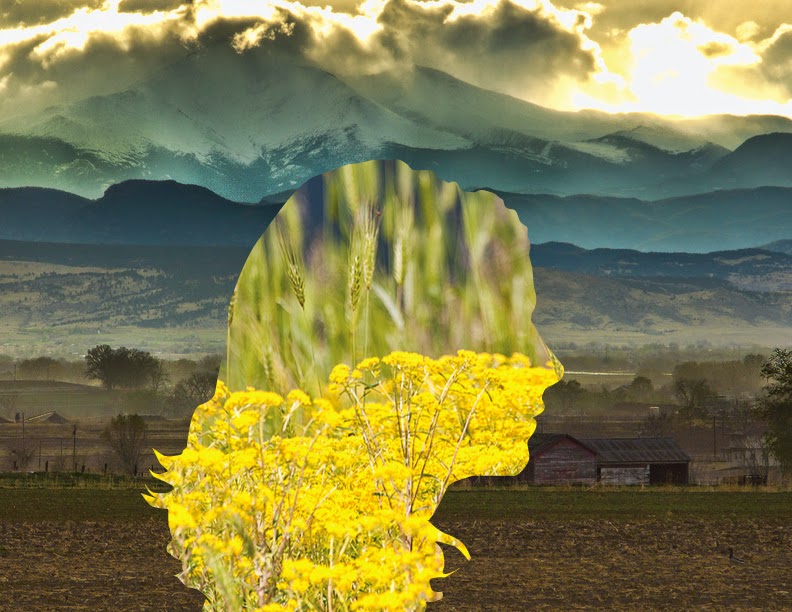
Step Four: Use Clipping Masks to create a see through silhouette

ONE is required for your portfolio- more is encouraged for Above & Beyond!!!!